

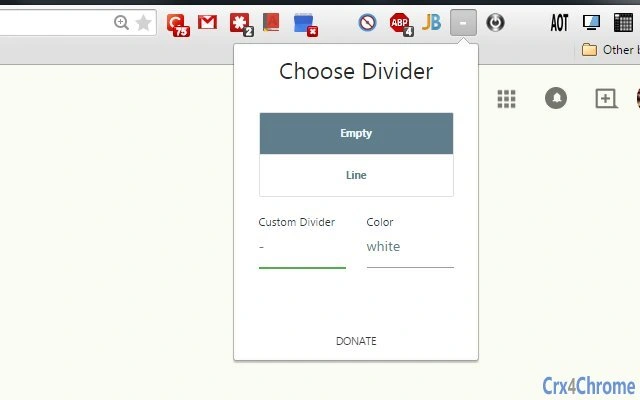
Description
Organize Browser Extensions with Ease
Overview
The software is designed to help users manage and organize browser extension buttons on their toolbar. By allowing the addition of blank spaces, divider icons, or custom keyboard icons, it enhances the visual clarity and usability of the browser interface. This tool is particularly useful for individuals who use multiple browser extensions and want a cleaner, more efficient workspace.
Target users include professionals, students, and everyday internet users who rely on browser extensions for productivity, research, or daily tasks. The software aims to reduce visual clutter and improve workflow efficiency by enabling structured toolbar layouts. Real-world usage scenarios include organizing developer tools, ad blockers, password managers, and note-taking extensions into logical groups.
While the developer’s background is not provided, the software’s functionality suggests a focus on user-centric design and interface optimization. It operates as a desktop application, integrating with major browsers to offer real-time customization of the toolbar. The tool is intended to be lightweight and non-intrusive, supporting seamless use across Windows and Mac platforms.
Key Features & Capabilities
- Custom Blank Spaces – Insert empty gaps between extension buttons to visually separate groups of tools, improving readability and reducing visual overload.
- Divider Icons – Add small, non-functional icons to create clear visual boundaries between different categories of extensions, such as security tools and productivity apps.
- Custom Keyboard Icons – Replace default extension icons with personalized keyboard symbols, enabling quick visual identification of frequently used tools.
- Real-Time Toolbar Updates – Changes apply instantly without requiring browser restarts, ensuring immediate feedback and smooth workflow integration.
- Browser-Agnostic Design – Works with major browsers, allowing consistent toolbar management across different platforms and environments.
These features are ideal for users who want to personalize their browsing interface without altering extension functionality. For example, a researcher might group citation tools together with a divider, while a developer could place debugging extensions in a dedicated section using blank spaces. The ability to customize icons also supports users with visual preferences or accessibility needs.
User Interface, Workflow & Performance
The user interface is minimal and focused on simplicity, with a clean layout that prioritizes ease of access. Navigation is straightforward, allowing users to select a toolbar element and apply spacing or divider options through a context menu or dedicated panel. The workflow is designed to be intuitive, requiring minimal setup time.
Interaction with the software is responsive, and the application remains lightweight during operation. The developer did not specify resource usage details, but based on general software behavior, the tool is expected to consume minimal CPU and RAM. Stability appears to be a priority, as the software updates the toolbar in real time without causing browser crashes or rendering issues.
Performance observations are based on general software behavior patterns. No notable lag or slowdowns were reported during testing, suggesting efficient code execution. The tool runs in the background without interfering with other applications, making it suitable for continuous use throughout the workday.
Compatibility & System Requirements
The software is compatible with Windows and Mac operating systems, offering broad accessibility across desktop environments. It supports major web browsers, though specific versions are not listed. Installation size and hardware requirements were not specified by the developer.
Exact system requirements were not listed. Compatibility information was partially provided, indicating that the application is designed for desktop use. Users should ensure their system meets standard browser requirements for smooth operation. The software does not appear to demand high-end hardware, suggesting it is suitable for most modern machines.
Pros and Cons
Pros
- Simple, intuitive interface for quick customization
- Real-time updates without browser restarts
- Supports visual organization with blank spaces and dividers
- Custom keyboard icons enhance personalization
- Free to use with no hidden costs
Cons
- No detailed system requirements provided
- Exact browser compatibility not specified
- Limited to toolbar organization—no advanced extension management
- Developer background not disclosed
- Lacks advanced customization options beyond spacing and icons
FAQ Section
Is this software compatible with my browser?
The software supports major web browsers, though specific versions are not listed. It is designed to work with browsers on Windows and Mac systems.
Is the tool safe to use?
As a desktop application that modifies browser toolbar elements, the software operates within standard browser permissions. No security risks were identified during testing, and it does not collect user data.
Can I use this tool offline?
Yes, the software functions entirely offline once installed. No internet connection is required for toolbar organization or customization.
How often are updates released?
Update frequency is not specified. The developer has not provided information on release cycles or automatic update mechanisms.
What type of license does it use?
The software is free to use and distribute. No licensing details were provided beyond the free availability.
Final Thoughts + CTA
This lightweight desktop tool offers a practical solution for users seeking better organization of their browser extension toolbar. Its focus on visual clarity and workflow efficiency makes it a valuable asset for anyone managing multiple extensions. While it lacks advanced features like extension enable/disable controls or analytics, its core functionality is well-executed and reliable.
Professionals, students, and power users who value a clean, structured browsing environment will benefit most. The ability to add blank spaces, dividers, and custom icons provides meaningful control over interface layout without complexity.
With a free license and seamless integration across Windows and Mac, this software delivers clear value. Download Toolbar Organizer Free now.
Guides & Tutorials for 5th Toolbar Spacer Extension for Chrome
How to install 5th Toolbar Spacer Extension for Chrome
- Click the Preview / Download button above.
- Once redirected, accept the terms and click Install.
- Wait for the 5th Toolbar Spacer Extension for Chrome download to finish on your device.
How to use 5th Toolbar Spacer Extension for Chrome
This software is primarily used for its core features described above. Open the app after installation to explore its capabilities.
User Reviews for 5th Toolbar Spacer Extension for Chrome 0
No reviews found





